Free tutorials & learning
A collection of all of my free tutorials that cover a broad spectrum of game development techniques and workflows
A collection of all of my free tutorials that cover a broad spectrum of game development techniques and workflows

This video is a simple update to my movie theater project in Unreal Engine 5. This is one that was shelved for a little bit on the channel but I recently am reviving it to give the environment another chance.

This beginner tutorial goes over an option that I like to use with my blockouts. Once I have made a simple blockout in Unreal Engine, I will combine the blocks into a static mesh and then I can also export it if need be to use for reference in my preferred modeling software instead.

This beginner tutorial goes over the basics of adding cameras to your scenes and using them to take screenshots. I like to go ahead and start to setup my compositions and camera shots early on when building an environment. This helps me understand where to give priority in the world and also it allows me to build out an interesting storytelling composition.

As a little change up for Earth Day, I decided to make a long form video where I created a piece of vegetation showing a lot of the process work in Speedtree. Each vegetation type can sometimes lead to different ways of building it, but for the instance of this asset, this is how I went about it.
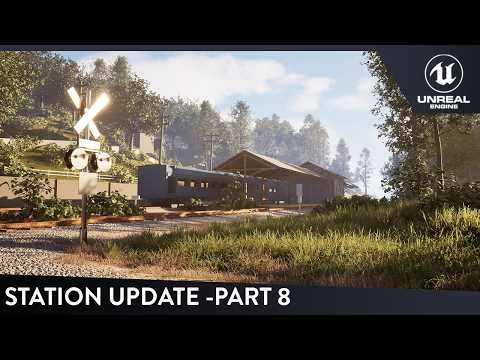
With episode 8 of the train station environment series, we are continuing to do a good amount of grass adjustments and changes. New additions of assets and also changes to the existing shapes overall. Additionally we start to replace even more of the flat blockout materials with some sort of temporary substitution of material info.

This simple tutorial goes over how you can setup displacement on your landscape materials. This allows you to fix those flat looks of your ground and start to get a lot more height information. Using nanite for the displacement itself, we are able to get a good amount of detail with a single map.

This video covers one of the features of the modeling tool plugin in Unreal Engine 5. With this tool you are able to edit your uvs of existing models inside of the engine. Whether its creating custom uvs or just doing a simple auto uv to clean things up, this can be super helpful for avoiding having to hop back and forth between programs!

In Episode 7 of the train station series in Unreal Engine 5, we are adjusting our ground landscape to match up with the temp models that we had placed in there and getting our landscape material in line. In the second half we are primarily trying to replace our blockout shapes with actual assets that we can further model out in a kit and remove as much of the unreal cubes as possible.

In this video I do a challenge where I make an environment out of a single asset. The asset in question for this challenge is a single chocolate chip cookie from Quixel Megascans. This was just a fun challenge to see what I can do with limitations of using a single asset.

In Episode 6 of the train station series in Unreal Engine 5, we are adding a lot of new assets. The first half of the video is catered to covering vegetation placement for a much denser and fuller background with our new layout and the last part of the video covers some new models coming into the level as a whole. WE are primarily trying to now replace our blockout shapes with actual assets that we can further model out in a kit and also get a good understanding of how much our veg will need to support the level.
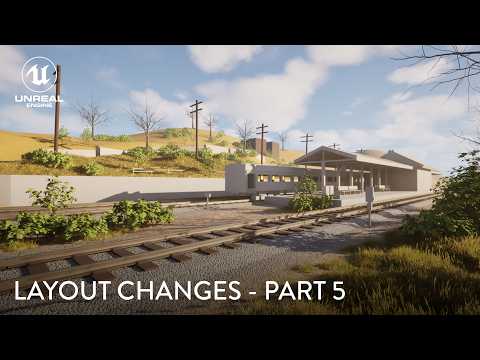
Episode 5 of this series covers a big change to the layout. I decided that the layout was a bit too flat and I have done some farms in the past so I decided to come back with a lot of elevation. I plan to add a good amount of vegetation around the hills as well as this one goes along. My main lesson in this one is how you should always be open to changes if you feel theyll take the environment in a better direction. Dont get stuck on your original blockout.

This timelapse is episode 4 of a series covering my process of building a new environment in Unreal Engine 5. Now that we have mostly finished the blockout, this video starts to dive into getting some custom made first pass models into the space and additionally starting to place in some different elements of color through materials. In the next video we will be hitting on some big changes and drastically adding to the space.

This video covers re-lighting one of the Quixel demo environments that are found free on the FAB Marketplace. With this video, the goal is to demonstrate how to get rid of all of the previous lighting in a scene and setup new lights rather quickly to instantly see results!

This timelapse is episode 3 of a series covering my process of starting out a new environment layout in engine. Using what I have so far, I build upon my blockout with the shapes in unreal engine and then once satisfied with the layout, I begin to import some other models and also setup shaders. In the next stage I will be diving into a lot more of the asset gym and replacing the blockout.

This timelapse is episode 2 of a series covering my process of starting out a new environment layout in engine. Using just the blocks in Unreal Engine I have fun in this stage figuring out an interesting location and setting the vignette. This video is after my initial video and I am continuing to figure out what the space will be.

In this video we go over how to setup a simple river or stream inside of Unreal Engine 5. Unreal Engine has a water plugin that comes default with the engine. After enabling we walk through a couple of the features and how quickly you can add it to your scene. This is a simple video covering some of the basics.

This is a video covering what comes in the Haunted House environment pack from the FAB marketplace. A culmination of over 40 assets, 15 shaders, & 58 textures with 2 environment maps that show examples of how you could build it out yourself. A great pack for environment relighting, setting up a quick spooky scene, or adding to something that already exists!

Inspired by previous videos that I did covering material blending and working with ground blends inside of unreal engine and additionally my first ground material pack, I created this stylized material pack. The perfect combination of ground materials to allow you to quickly setup a stylized natural environment of organic elements. Stylized Materials in this pack include: Grass, Dirt, Rocky Dirt, Cobblestone, & Dirt/Grass Weed Blend. 2 Master Materials & 8 Material Instances 26 Targa textures are also included that make up these 5 materials. Organized materials allows for materials instances to be extremely easy to work with and customize to your liking. Additionally includes two demo grass assets that comes with models. This is intended to show how the material blends could work alongside the rest of your scene assets and environment. Overview map displays the materials and additionally shows some examples of how you can blend using them